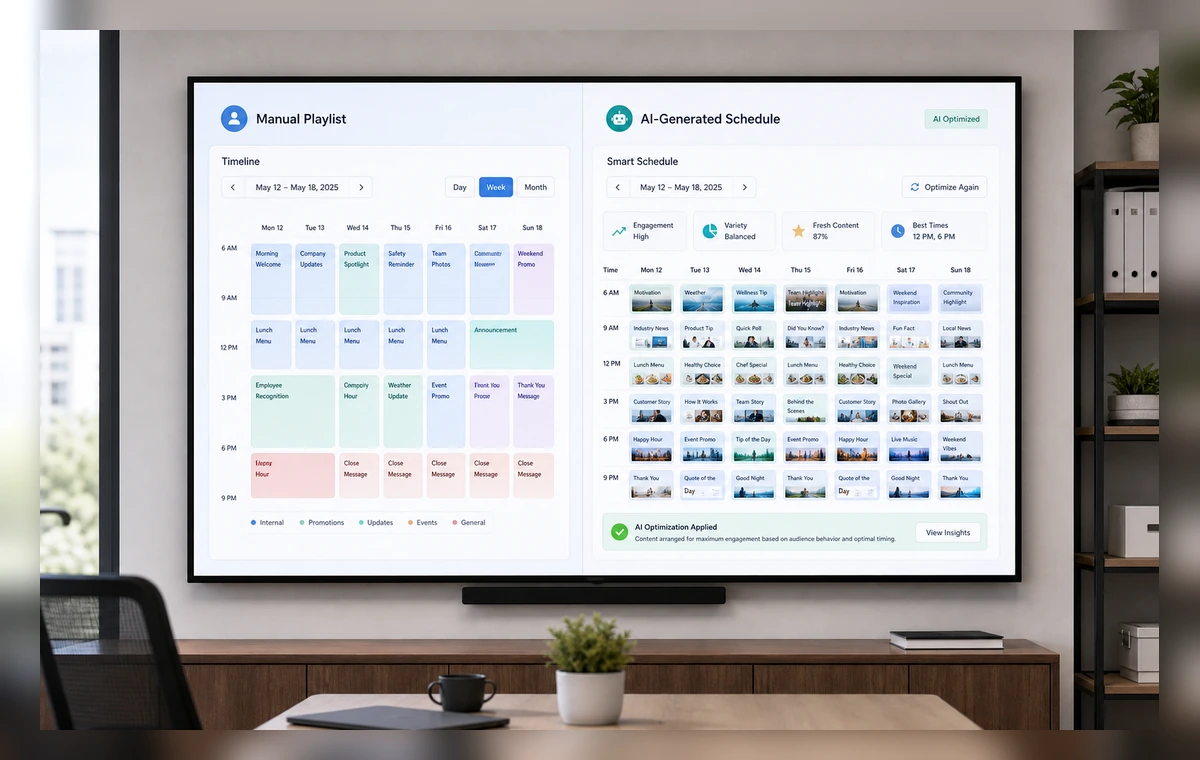
Help me use AI scheduling instead of manual playlists on the team TV.
I can help. First connect or choose AI schedule suggestions and playlist blocks, then I will prepare the screen for review.
Put it on the lobby screen and keep it simple.
Ready for review. I prepared the slide, selected the paired screen, and kept the layout readable from a distance.
1
Connect AI Scheduling
Open ScreenaAI Console, choose Apps & Integrations, and connect AI Scheduling.
2
Create a slide
Go to Slides, create a new slide, choose AI scheduling content, and review the screen layout.
3
Assign and display
Add the slide to a playlist, assign it to your paired screen or screen group, and publish.
Why show AI scheduling on TV
Important updates lose value when they stay buried in tabs, tools, and private dashboards. ScreenaAI helps teams turn AI schedule suggestions and playlist blocks into a shared screen that people can understand at a glance.
What to show
Use the TV for the information your audience needs repeatedly: status, schedules, priorities, announcements, queues, or live progress. Keep private details out of shared spaces and favor large cards, short labels, and simple charts.
AI setup versus manual setup
The AI path is best when you can describe the outcome in plain language. Manual setup is best when you want to choose the exact AI Scheduling content, layout, playlist, and screen yourself.
Step-by-step summary
- Connect AI Scheduling in ScreenaAI Console.
- Create a slide and review the layout for TV readability.
- Assign the slide to your paired screen or screen group and publish.
How do I use AI scheduling instead of manual playlists with ScreenaAI?
Open ScreenaAI Console, configure AI Scheduling, create the screen-ready slide, then assign it to your paired screen or screen group.
Can I use AI instead of the manual setup?
Yes. Describe the screen you want in plain language, then review the suggested AI scheduling setup before publishing.
How long does setup take?
The manual setup is designed to stay under 2 minutes for a simple screen. The AI approach is faster when AI Scheduling is ready to use.
Do I need to keep a browser open on the TV?
No. Pair the screen once, publish from ScreenaAI Console, and manage the content from the Console.